
Ask Attio
A Fundamental Shift in How We Work with CRM Data

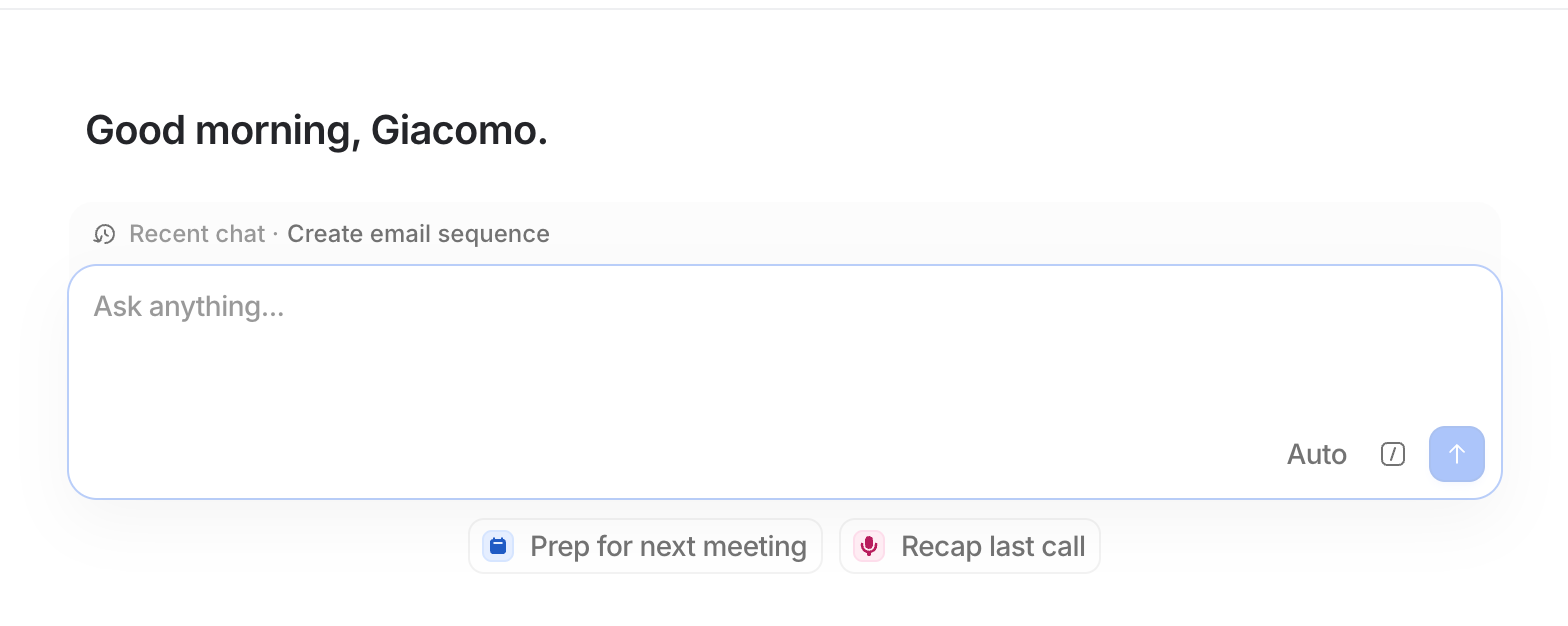
The Context: From CRM Clutter to Instant Clarity
Every GTM leader and RevOps pro knows the struggle: important context is scattered across emails, call notes, and records. Before a big meeting, you’re frantically clicking through tabs, digging for that one critical detail. Sales reps waste hours hunting for context, customer success rebuilds account history from scratch, and executives end up making decisions with incomplete data . It’s not for lack of data – it’s that our tools haven’t made sense of it for us.
Attio’s latest release Ask Attio aims to change that. Launched this week, Ask Attio is an AI-powered conversational interface that lets you search, update, and create across your entire CRM just by asking . In plain English: you talk to your CRM, and it understands your business. This isn’t another gimmicky chatbot bolted onto a legacy system – it’s built on Attio’s core Universal Context engine. That means every customer email, call transcript, note, and even product usage signal in Attio is semantically indexed as one connected whole . The upshot for RevOps and GTM teams is immediate, unified answers instead of manual data sleuthing.
We’ve seen plenty of AI assistants hyped by the big CRM players, but those often amount to flashy demos that fizzle out when faced with real-world CRM messiness. (Salesforce’s “Einstein” or HubSpot’s chat helpers might answer simple questions, but ask them to navigate your custom fields and tangled timeline, and they hit a wall.) Attio’s approach is different because it tackled the data unification problem first. With Universal Context knitting every interaction together, Ask Attio can truly grasp the story in your CRM, not just keywords. It deeply understands your entire business context, giving you what you need the moment you ask . This feels like a meaningful shift: instead of you adapting to the CRM, the CRM adapts to you.
Why Ask Attio Is a Big Deal for RevOps
In practical terms, Ask Attio turns your CRM into a proactive partner. You’re no longer confined to dashboards and forms; you have a conversational AI that can retrieve insight or perform actions on command. Here’s why this release matters:
Universal Context = No More Siloed Info. Ask Attio is powered by Universal Context, Attio’s unified intelligence layer that treats all your data as one interconnected knowledge graph . It preserves links between signals – so that an email thread about pricing, a dip in product usage, and a new stakeholder joining all connect. This is huge for GTM teams. Seeing those connections instantly is what separates good teams from great ones. Now you can simply ask, “What’s the story with Account X?” and get the full picture in seconds – including that the VP raised a budget concern last month, their usage dropped two weeks ago, and a new CFO came onboard last quarter . That kind of holistic insight used to require painstaking manual research (or more often, never happened at all).
Truly Conversational Updates and Queries. Unlike basic chatbots that only spit out answers, Ask Attio can take action. Because it understands context, you can describe an update or task in natural language and it will execute it (with your approval). Need to log a meeting outcome? Just tell Attio what happened, and it will update the deal stage, set the next step, add the meeting notes, and even assign follow-up tasks for you . Want to add a new contact you met? Say the word, and their details are created in the CRM. This turns data entry and CRM upkeep – traditionally RevOps pain points – into something that happens in the flow of conversation. Your CRM starts to maintain itself, so your team can focus on selling and strategizing.
“Always-on” GTM Intelligence. Because Ask Attio can pull from all your connected data, it’s like having an analyst on call 24/7. GTM leaders can ask high-level questions that would’ve taken an ops team days to answer. “Which deals are at risk this quarter and why?” “What do our win rates look like for deals over $50k?” “Which customers mentioned Feature X in the last month?” – instead of running reports, you get answers on demand, grounded in real data. One Attio customer, Plain, uses Ask Attio to quickly answer questions about win rates, pipeline health, and the overall state of play in their business . Another team, Wordsmith, reports that their leadership can now get immediate answers about competitive deals and pipeline trends, accelerating strategic decisions . In short, data-driven decision making becomes a natural part of the day-to-day, not a special project.
Built for the Real World (Trust and Control). A critical point for RevOps: Ask Attio was designed with enterprise guardrails. Every answer it gives is backed by actual records and notes – real information, not AI invention . The AI won’t hallucinate some non-existent deal; it’s constrained to your truth. It also respects user permissions by design, so a sales rep will only get insights from data they have access to . That alleviates the risk of sensitive info inadvertently surfacing. And when it comes to taking action, Attio’s philosophy is “AI suggestions, human decisions.” The AI might propose updates or draft an email, but you always get the final say – nothing is changed unless you click “Accept” . This transparent, controlled approach is exactly what RevOps teams need to trust an AI agent in their workflow (and it’s something many other AI-for-CRM tools have overlooked).
Ask Attio in Action: Everyday Use Cases
So what does Ask Attio actually do for your team on a daily basis? Here are some real examples of how GTM teams are using it to streamline work:
Lightning-Fast Meeting Prep: Instead of combing through CRM records and past emails before a call, reps can just ask Attio to “Prep for my next meeting.” Within moments, they get a comprehensive brief: who the participants are (with roles and recent interactions), the full account history (notes from previous calls, emails, support tickets), product usage trends, even any open deals or support issues – all summarized in plain language. Sales teams have literally cut pre-meeting research down to seconds. One user, Ian Ahuja (Head of Sales at Lightdash), says “Before every meeting, Ask Attio centralizes, summarizes and surfaces everything I need to know to give a great first impression or close the deal.” His team reports that what used to take 30 minutes of prep now takes 30 seconds. In fact, Lightdash is prepping for meetings 10× faster by letting Ask Attio gather context across product usage data, customer history, and even browser research – instead of reps doing it all manually .
Hands-Free Post-Meeting Follow-Up: After a sales call or customer meeting, the real work often begins – updating the CRM and sending follow-ups. Ask Attio takes on much of this grunt work. Simply prompt “Recap last call”, and it will generate a structured call recap and log it in the record (leveraging call transcripts if available). It can then update the opportunity status, next steps, and any fields that changed (for example, if the prospect mentioned a new timeline or a role change, those details get captured) . Finally, it can draft a personalized follow-up email to the client, summarizing key points and proposing next actions – ready for the AE to review and send . All of this happens in one conversational flow. No more forgetting to log notes or letting tasks slip through: Ask Attio ensures nothing falls through the cracks. Early users love this. The team at Marketer, for instance, now uses Ask Attio to draft context-rich follow-up emails right after calls, instead of bouncing between call recordings, an AI writing tool (like Claude), and their email client . It’s one stop and done. Reps stay in the zone, and data gets updated as a byproduct of talking to the assistant.
Contextual Record Updates on Command: Perhaps one of the most game-changing aspects for RevOps is how updating CRM data becomes as easy as asking. Let’s say you just learned on a call that your deal’s champion got promoted to Head of IT, and the client company also raised a new funding round. Normally, you’d have to navigate to the contact, update their title, find the account, update a funding field, etc. With Ask Attio, you can literally say: “Update this deal – change the champion’s role to Head of IT and note that the account raised $120M.” The AI understands and will propose those exact field updates right in the chat: e.g. “Update Drew Houston’s role to Head of IT?” (Accept) and “Update Greenleaf’s funding to $100M–$250M range?” (Accept) . You confirm, and it’s done. This level of context-aware editing is something we’ve hoped for in CRM for years. It means your data actually keeps up with reality without heavy lifting. For RevOps, that translates to dramatically higher data hygiene and timeliness – the bane of every ops person’s existence. As one beta user put it, Ask Attio turns a two-hour CRM admin slog into a two-minute chat.
On-Demand Insight and Analysis: Ask Attio isn’t just automating workflow – it’s also augmenting your decision-making. GTM executives and RevOps leads can use it like an analytical advisor. You might ask, “Which customers have mentioned pricing pain in the last month?”, or “Show me all deals in Q1 where no next step is set,” or even “What should I know today?” and get meaningful answers. Because it draws on all your customer signals, the answers are often things you wouldn’t catch in a standard report. For example, Ask Attio can identify a pattern where users who raised a certain feature request also have low adoption, flagging a churn risk cluster. Or it can instantly pull up a list of accounts that fit a certain profile (say, who would benefit from a new feature launch) by understanding context from notes and usage, not just checking a box in a field . Teams are already leveraging this for proactive moves: Listen Labs, as an early adopter, uses Ask Attio to turn their trove of customer call transcripts into messaging insights – essentially asking the AI what resonates across different segments and getting a distilled answer . Similarly, Plain’s team can get quick reads on pipeline health or win rates without waiting for a weekly report . This kind of accessibility to insight means faster, better decisions at every level, from front-line managers adjusting strategy mid-quarter to CEOs prepping for board meetings with real-time metrics.
(Even Customer Success and onboarding teams are benefiting – using Ask Attio to generate instant account onboarding briefs or transition notes. A CSM taking over an account can ask, “What’s the history here?” and get a concise narrative of all interactions to date, plus product usage trends and any open issues. That kind of head start is invaluable for driving customer growth from day one . In founder-led sales scenarios, founders love Ask Attio because it connects what prospects say with how they use the product and where they get stuck – revealing not just what customers want, but why . In short, every go-to-market function finds something to love here.)
Early Results: Real Teams, Real Impact
Attio’s beta users have already reported impressive gains from Ask Attio. Some highlights from the launch:
Wispr Flow – Responds to customers faster and more confidently, now that all relevant notes and action items are surfaced together when they need them .
Lightdash – Preps for sales meetings 10× faster by letting Ask Attio pull product usage stats, past conversations, and key context in one go (no more digging through dashboards and Gmail threads separately).
Marketer – Writes better follow-up emails in a fraction of the time. Their team uses Ask Attio to draft contextual emails directly from CRM data, instead of juggling call recordings, a writing AI, and an email client .
Listen Labs – Turns aggregated customer call data into actionable messaging insights. By asking Attio to find what resonates across features, accounts, and deal stages, they extract themes that inform marketing and product messaging .
Plain – Stays super agile in an evolving go-to-market motion by querying Attio for on-the-fly answers about win rates, pipeline health, and other vital stats . They no longer wait for a data analyst to run a report – the answers are immediate, so they can adjust tactics quickly.
Wordsmith – Gives its leadership team instant visibility into the business. Ask Attio provides immediate answers to questions on competitive deals or pipeline status, accelerating their strategic decision-making . Essentially, meetings that used to require “I’ll get back to you on that” now get answers in the room.
It’s early days, but these examples show the potential: major time savings, smoother handoffs, and smarter decisions. When a Head of Sales says this tool surfaces “everything I need to know to close the deal,” you pay attention. When a team claims 10× faster prep or stops using three different apps to piece together an email, it’s not hype – it’s actual workflow change.
Strategic Perspective: How GTM Teams Should Leverage Ask Attio
From a RevOps leader’s standpoint, Ask Attio’s release signals a new expectation for CRM software. Your CRM shouldn’t just be a database of record; it should be a partner in action. Here’s how this shift changes workflows and what you should consider:
1. Embrace the “AI Co-pilot” Mindset: Your team can now interact with CRM data more naturally, which means processes can be redesigned around conversation rather than clicks. For example, instead of a sales playbook that says “research the account via XYZ sources,” you might institutionalize “ask Attio for an account brief” as the first step. Reps stay in flow, and nothing important is missed . Leaders should encourage their teams to use these features habitually – the more you ask, the more value you get. It’s a bit of a culture shift: moving from “Did you update the CRM and check the notes?” to “Did you ask Attio to catch you up?”.
2. Prioritize Data Foundations (Garbage In, Garbage Out): While Ask Attio can work wonders, it’s not a magic wand for bad data. In fact, it will shine a bright light on gaps or inconsistencies in your CRM. If your pipeline stages are a mess or half your calls aren’t logged, the AI can only do so much. In my experience, an AI agent will not save a broken GTM – it will make it fail faster . Use this launch as an impetus to audit your CRM schema and data hygiene. Clean up your fields, ensure your email and call syncs are working, and define clear ownership of data. Attio’s architecture gives you a solid flexible base (custom objects, fast API, etc.), but you need to have that base organized. The good news is, once you do, Ask Attio will help maintain it – it’s far more enticing for reps to simply chat and let the AI log the call and next steps than to painstakingly fill out forms. But you must lock in those minimal processes first.
3. Start Tactical, Then Scale: Don’t try to “boil the ocean” on day one with AI. A tactical rollout will yield the best results. Pick one or two high-impact workflows to start – say, meeting prep and post-meeting follow-up. Enable Ask Attio for a small team and set clear guidelines: for example, “The AI can auto-create tasks and update fields X, Y, Z, but reps should review all changes.” Monitor adoption and impact. Track metrics like the percentage of opportunities with next steps logged, or the average time between a meeting and when the CRM is updated . If you see improvement (which I suspect you will), then expand to more teams and use cases. If not, gather feedback, adjust prompts or data mappings, and iterate. Essentially, treat Ask Attio like a new team member – onboard it with a focused role and measure its performance.
4. Leverage the Prompt Library and Best Practices: One clever feature of Ask Attio is the Prompt Library – a collection of pre-built prompts and workflows for common tasks (e.g. “Daily brief”, “Objection handling”, “QBR prep”) . RevOps leaders should take advantage of this. Curate a set of prompts that match your go-to-market motions and share them with the team. You can even customize prompts to your jargon or process (for instance, a prompt for “Prep for renewal call” that not only pulls past notes but also usage and support tickets specific to your SaaS metrics). This turns best practices into standard practice across the org. The idea is that your top performer’s habits (say, always researching a prospect’s recent funding before a call) can be templatized so everyone gets that benefit automatically. It’s a new kind of enablement – less training slides, more AI-assisted workflows baked right into the tool.
5. Maintain Human Oversight and Continuous Improvement: Even as Ask Attio automates work, keep a human in the loop for quality control. Encourage reps and managers to treat the AI’s output critically – verify important answers, double-check suggested updates – especially early on. Build trust in the system by instituting something like a weekly audit: e.g. every Friday, review a handful of AI-generated notes or changes with the team (we do this at Novlini in our “Friday AI review”) . This practice not only catches any issues (maybe a prompt needs tweaking or a field isn’t being captured right), but it also increases everyone’s confidence in the AI. Over time, as the accuracy proves out, you can dial up automation (perhaps allow certain low-risk updates to auto-apply, etc.). The key is to treat Ask Attio as a junior analyst with superpowers – amazing at speed and aggregation, but guided by your expertise and business judgment.
The Bottom Line: CRM Enters a New Era
Attio’s Ask Attio launch represents more than just a cool new feature – I believe it’s indicative of a broader shift in CRM and RevOps tooling. We’re moving into an era where real-time context and intelligent assistance are table stakes. The CRM is no longer a passive system of record; it’s becoming an active participant in your revenue engine. For GTM executives, this means higher team productivity and better decision-making with less guesswork. For RevOps, it means finally cracking the age-old problems of CRM adoption and data quality, by offloading the drudgery to an AI that actually does what it promises.
Crucially, Ask Attio achieves this without the fluff. It’s not about AI for AI’s sake. It’s about solving the tactical pains – prepping for calls, logging notes, updating fields, finding insights – in a way that keeps your team in flow and your data truthful . When you can ask “What should I know today?” and actually get a useful answer , you realize the CRM can be so much more than a glorified spreadsheet.
From my perspective, this is the kind of advancement that will become standard in the next 1–2 years. We’ll look back on manually trawling through CRM records as antiquated. As with any shift, those who adapt early will have an edge. Teams using Ask Attio (and tools like it) will have more informed reps, tighter execution, and a clearer view of their business. Those that stick to business-as-usual may find themselves outpaced by competitors who are literally getting answers and work done faster.
In sum, Ask Attio is a breath of fresh air in a space that’s long overdue for innovation. It combines the strategic big-picture promise of AI in CRM (universal context, automated intelligence) with very concrete, tactical benefits (shaving hours of busywork every week, keeping pipeline data fresh, delighting customers with timely follow-ups). It’s early, but the results are promising and the vision is sound. As an Attio Expert Partner and someone who has spent countless hours wrestling with CRMs, I’m excited – and admittedly a bit relieved – to see a solution that hits the mark in practice.
No hype needed: if your CRM can tell you exactly what you need to do today and handles the busywork, that is a game-changer. Ask Attio points to a future where our systems actually work for us. And that future has just arrived, starting with the teams savvy enough to ask more from their CRM .